



Yes, our inventory is accurate!
 Qualifies for Free Ground Economy Shipping (CONUS Only)
Run your whole imaging rig from your phone
Why we like the ASIAIR Plus:
- No laptop at the telescope: one small box on the scope runs the mount, camera, guiding, focuser and filter wheel, and you control it all from a phone or tablet app.
- The hard parts are automated: polar alignment without seeing Polaris, plate solving to center targets, autofocus, guiding and meridian flips are each a tap or run on a schedule.
- Room for years of data: 256GB of built-in storage holds many nights of full-resolution subs, and the 256G version connects to ZWO's AM3N, AM5N and AM7 mounts over Bluetooth.
- What we tell customers: it's the easiest way into deep-sky imaging, especially with ZWO cameras and mounts. If you already love Windows software like N.I.N.A., a mini PC gives you more options.
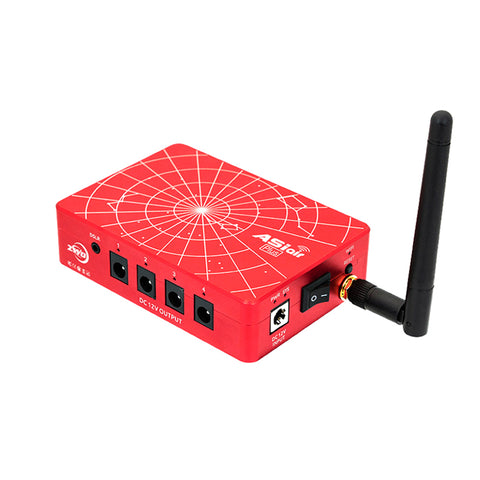
The ZWO ASIAIR Plus 256GB is a Wi-Fi astrophotography controller about the size of a deck of cards (210g). It mounts on your telescope, connects to your camera, guide camera, mount, focuser and filter wheel, and runs everything through the free ASIAIR app on iOS or Android. It's the controller we recommend most often with ZWO cameras and mounts, and it also works with many Canon, Nikon and Sony cameras and most popular GoTo mounts.
Key specs: 256GB eMMC storage · 4GB RAM · 2 USB 3.0 + 2 USB 2.0 ports · four 12V DC outputs (5A total) · dual-band 2.4/5GHz Wi-Fi · gigabit Ethernet · Bluetooth for ZWO AM mounts · 12V input · 210g

What you can capture
- Deep-sky imaging sessions: plan a night of subs on the Orion Nebula, Andromeda Galaxy or Heart Nebula, then let it run with guiding, dithering, autofocus and meridian flips.
- Live stacking: watch a galaxy or nebula build up on your phone in real time, great for outreach and star parties.
- Planetary and lunar video: record high-frame-rate video of Jupiter, Saturn and the Moon for stacking.
- Calibration frames: scheduled plans can include darks and flats so your data is ready to process.
How it works
Mount the ASIAIR on your telescope, plug in 12V power and your devices, and connect your phone to its Wi-Fi hotspot. The app walks you through polar alignment (it works even when Polaris is hidden), then you pick a target from its library of more than 14,000 objects. The mount slews, the ASIAIR plate-solves and centers the target, starts guiding and begins your exposures.
The four 12V outputs power your camera cooler, dew heaters and other gear, which keeps cables to a minimum. The ASIAIR mounts with the M4 and 1/4-20 holes on its body, on a finder shoe or with the ZWO DOVE AIR clamp.
What to add for the best results
- ZWO 12V 5A power adapter (required): the ASIAIR needs 12V power, which isn't included. In the field, use a 12V power tank.
- ZWO ASI220MM Mini and a guide scope or off-axis guider: for autoguiding, which the ASIAIR runs built in.
- ZWO EAFN auto focuser: adds one-tap autofocus and automatic refocusing through the night.
- ZWO DOVE AIR clamp or ZWO finder base FS-II: mounts the ASIAIR on a dovetail or finder shoe.
- ZWO DC Y splitter cable: shares one 12V supply between the ASIAIR and your mount.
- A mount it can drive over Bluetooth: the ZWO AM3N or AM5N.
ASIAIR Plus vs. a camera with ASIAIR built in vs. a laptop
| ASIAIR Plus 256GB | ASI2600MC Air | Laptop or mini PC | |
|---|---|---|---|
| What it is | Separate controller on the scope | Cooled camera with ASIAIR and guide sensor built in | Windows computer running N.I.N.A. or similar |
| Works with | ZWO and many other cameras, most GoTo mounts | Its own sensor; ZWO and many other mounts | Almost any astronomy hardware |
| Setup | Phone app, guided steps | Phone app, fewest cables | More settings to learn |
| Best for | Most people starting deep-sky imaging | A one-box upgrade with the fewest cables | Advanced users who want full control |
See everything in our ZWO ASIAIR collection.
What's in the box
- ZWO ASIAIR Plus 256GB body with Wi-Fi antenna
- Two 0.5m DC male cables
- Two 1m DC male cables
- One 1.5m DC male-to-female extension cable
- One 0.75m USB 3.0 Type-B data cable
- ASIAIR Plus Activation Guide
The DC power cables use standard 5.5 x 2.1mm plugs.
The 12V power supply, guide camera, DOVE AIR clamp and DC Y splitter cable are sold separately. The 256GB version has built-in storage and no microSD card slot.
ZWO ASIAIR Plus FAQ
Is the ASIAIR good for beginners?
Yes. It's the easiest way we know to run a deep-sky imaging rig. The app guides you through polar alignment, focusing and framing, and most of the steps that trip up beginners are automated.
Which cameras and mounts does it work with?
All ZWO astronomy cameras, filter wheels and focusers, many Canon, Nikon and Sony cameras, and most popular GoTo mounts from ZWO, Sky-Watcher, Celestron and iOptron. Check ZWO's ASIAIR compatibility list for your exact model, or ask us.
Do I need a guide camera?
Not to get started, but guiding makes long exposures much easier. A ZWO ASI220MM Mini on a small guide scope is our usual pairing.
ASIAIR Plus or ASI2600MC Air?
The ASI2600MC Air puts an ASIAIR and guide sensor inside a cooled APS-C camera. Choose the ASIAIR Plus if you already own a camera or want to swap cameras later.
Does it need a power supply?
Yes. It needs 12V DC (2A minimum, up to 10A when it's powering other gear), which isn't included. Use the ZWO 12V 5A adapter or a 12V power tank.
Does it need an internet connection?
No. Your phone connects directly to the ASIAIR's own Wi-Fi, so it works at dark sites with no cell service. Wi-Fi range is about 20m (65ft).
Specifications
| Computer | |
|---|---|
| Memory | 4GB DDR4 |
| Storage | 256GB eMMC (no microSD slot) |
| Wi-Fi | 802.11 b/g/n/ac, 2.4GHz and 5GHz, about 20m range |
| Bluetooth | Connects to ZWO AM3N, AM5N and AM7 mounts |
| Ethernet | Gigabit RJ45 |
| Ports and power | |
| USB | 2 x USB 3.0, 2 x USB 2.0 |
| 12V outputs | 4 ports, 5A maximum total |
| Power input | 12V DC, 2–10A (supply not included) |
| Operating temperature | -10°C to 40°C (14°F to 104°F) |
| Physical | |
| Dimensions | 102.5 x 70 x 26.5mm |
| Weight | 210g (7.4oz) |
| Mounting | M4 and 1/4-20 threaded holes on the bottom and sides |
| Warranty | 2 years (ZWO) |
| Model / SKU | ZWO-AIRPLUS-256G |